
Listeningaudiobookshelf
Listening
What it shows
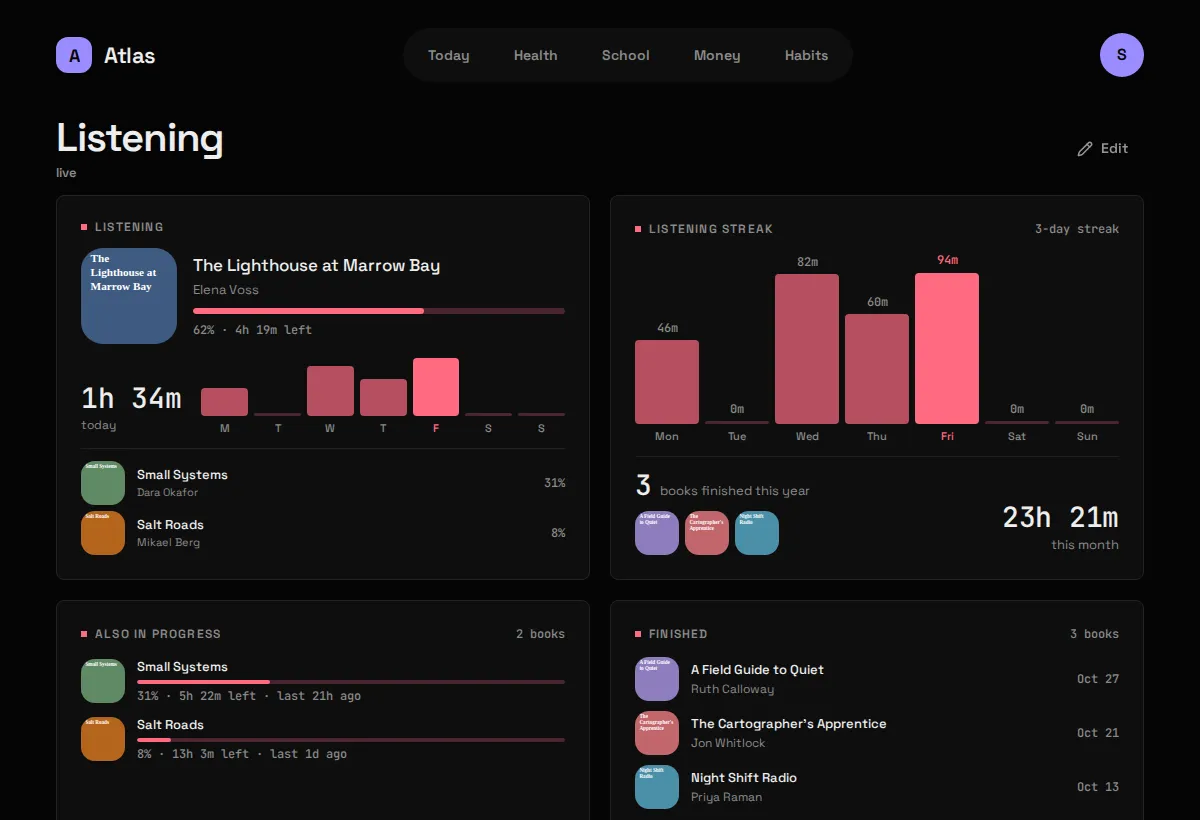
Section titled “What it shows”The audiobook you’re in the middle of, with its cover and how far along you are, a listening streak, everything else in progress and what you’ve finished, from Audiobookshelf. Listening has no tab of its own: tap a Listening Widget to open its Board. The screenshot above is before setup.
| Widget | Sizes | Where |
|---|---|---|
| Now listening | S M L | anywhere |
| Listening streak | M L | anywhere |
| Also in progress | M L | Listening only |
| Finished | M L | Listening only |
What you need
Section titled “What you need”- An Audiobookshelf you run yourself, reachable from
atlas-api. - An API key from it: in Audiobookshelf, Settings → API Keys.
-
Put the key in
.env:Terminal window ABS_TOKEN=... -
Tell Atlas where Audiobookshelf is, in
config/modules/audiobookshelf.yaml:base_url: http://audiobookshelf:80 # where atlas-api reaches itpublic_url: https://books.example.com # where your browser reaches it (optional) -
If Audiobookshelf runs in Docker on the same machine, let
atlas-apijoin its network with a compose override. -
Add
audiobookshelftomodules:inconfig/atlas.yaml, then:Terminal window docker compose up -d # up, not restart: .env changedcurl -s 127.0.0.1:8187/api/listening/ | python3 -m json.tool
Config keys
Section titled “Config keys”config/modules/audiobookshelf.yaml, plus ABS_TOKEN in .env.
| Key | Default | Meaning |
|---|---|---|
base_url |
http://audiobookshelf:80 |
Where atlas-api reaches Audiobookshelf. A Docker network name works here. |
public_url |
blank | Where your browser reaches it, for the “open in Audiobookshelf” link. Blank shows no link rather than a broken one. |
The Module reports “needs setup” until ABS_TOKEN is set.
What it stores
Section titled “What it stores”Live, stores nothing. No table, no migration. What the Widget shows is a position in a book, and that stops being true the moment you press play on your phone; an archived copy could only ever be behind.
Read-only, on purpose. Nothing in Atlas writes to Audiobookshelf, so no dashboard bug can ever move your place in a book.
The sync every 15 minutes is a reachability probe that writes nothing, so a revoked key shows up on the Status screen rather than as an empty Widget.
Gotchas
Section titled “Gotchas”- Covers go through Atlas. Audiobookshelf wants the API key on every cover request, and an image in a web page could only carry it by showing it to anyone who opens the page.
atlas-apifetches covers and serves them itself. base_urlis notpublic_url. The first can be a Docker network name, which means nothing to your laptop’s browser; the second is what the browser uses.- Ebooks count, but don’t take over. “Now listening” is the most recently advanced audiobook, so opening an epub once doesn’t push the book you’re eight hours into off the Widget.
- A rejected key is named. Audiobookshelf answers a bad key with a bare 401; Atlas reports it as a problem with
ABS_TOKEN. - A stopped Audiobookshelf is an error, not a blank, for the same reason as Money: there’s no last-good reading to fall back on.