Sync & freshness
The schedule
Section titled “The schedule”atlas-cron asks the API to sync each Source on a fixed schedule. Every attempt, success or failure, is recorded, which is what Freshness and the Status screen read.
| Source | Module | When | Kind |
|---|---|---|---|
weather |
open_meteo |
hourly at :07 | archived |
school |
canvas |
hourly at :15 | archived |
sleep |
google_health |
hourly at :40 | archived |
finance |
securo |
every 15 minutes | live probe |
listening |
audiobookshelf |
every 15 minutes | live probe |
Habits and Work have no sync: you are their upstream. Cron also calls notify every 5 minutes, which sends any Notifications that are due. It isn’t listed on the Status screen; the Notifications card there shows its last check instead.
Weather runs at :07 rather than :00 because the top of the hour is when every cron job on the internet hits Open-Meteo’s free tier at once. Health runs hourly, not nightly, because last night only exists once your watch syncs after you wake.
A live Source’s “sync” stores nothing. It’s a reachability probe, so a revoked key or a stopped server shows up on the Status screen instead of waiting to be found on an empty Widget.
Sync by hand
Section titled “Sync by hand”curl -X POST 127.0.0.1:8187/api/sync/weather # or school, sleep, finance, listeningcurl -s 127.0.0.1:8187/api/sync/status | python3 -m json.toolA Source whose Module is switched off answers 204 and does nothing, so cron stays quiet without you editing the crontab.
Freshness
Section titled “Freshness”Each Area’s header says how fresh its Source is:
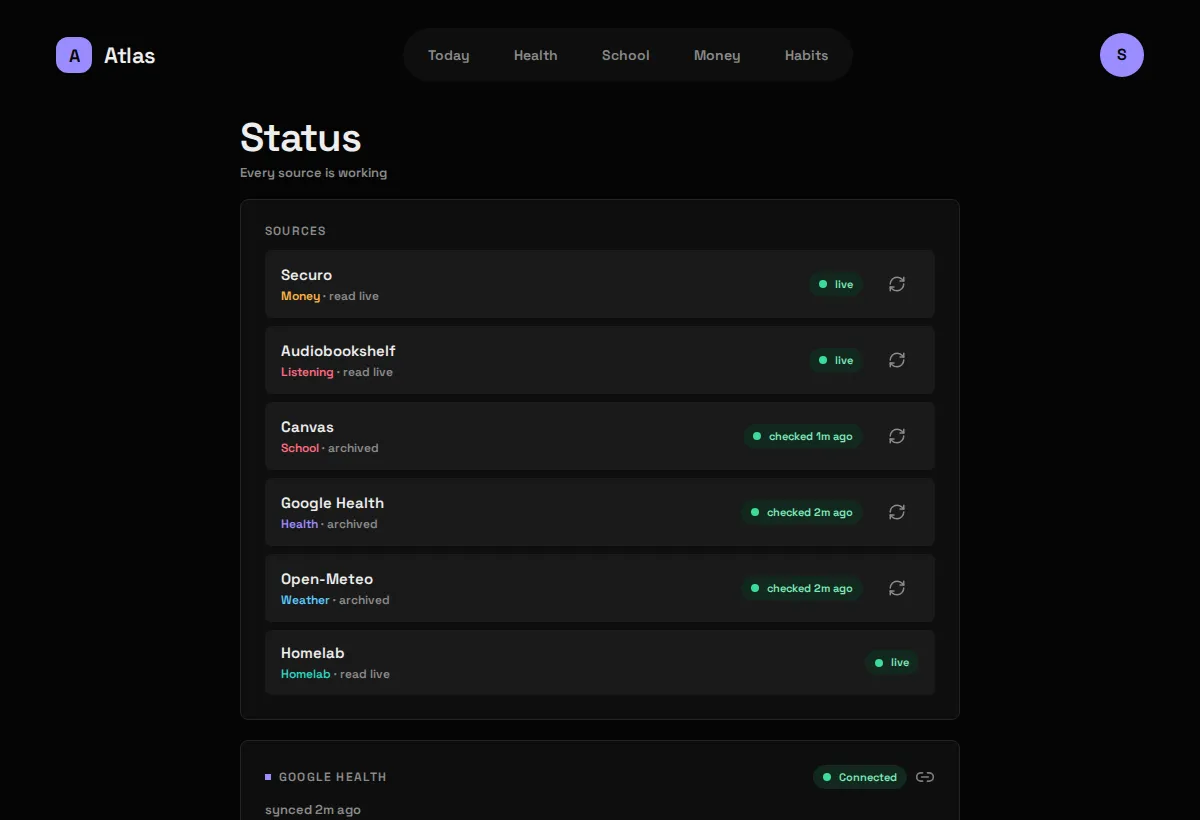
- checked 29m ago: an archived Source, and when it was last read successfully.
- live: a live Source that answered its last probe.
- needs setup · open Status: the Module is on but its settings or secrets are missing.
- sync failed: an archived Source’s last attempt failed. The Widgets keep showing the archive.
- unreachable: a live Source that didn’t answer its last probe.
Habits and Work show no Freshness: there’s nothing upstream to be fresh against.
Problems
Section titled “Problems”A Problem is a Source that needs you to act: not set up, signed out, unreachable. Today shows at most one chip for all of them (“2 sources need attention”); everything else lives on the Status screen.
The Status screen
Section titled “The Status screen”Behind the avatar menu, at /status. It lists every Source with its Area, whether it’s archived or read live, its Freshness, and a sync-now button. It also holds the one connection with controls: Google Health’s Connect / Reconnect / Disconnect.